
MEMZ is probably my favourite piece of malware ever. It doesn’t steal your passwords or ask for money: it just slowly turns your PC into total chaos with memes, and then it destroys it so it never boots again, with a Nyan Cat. It’s funny, scary and actually very clever, and it’s the virus I’ve tested the most on my channel.
joke / destructive
XP and newer
Where MEMZ came from
MEMZ was made in 2016 by a programmer called Leurak for danooct1’s “Viewer-Made Malware” series on YouTube, where viewers sent in malware they had built so he could test it on camera. Its name is a joke about memes, and it was designed to look like the funny old-school viruses from the 90s and 2000s, the kind that showed messages and animations instead of quietly stealing data.
It became really famous when Vinesauce Joel ran it live on stream the same year. Watching his PC fall apart with thousands of people in the chat made MEMZ one of the most watched pieces of malware on the internet, and it’s still one of the most tested viruses on YouTube today. Leurak liked it so much he even made a special version for Joel: VineMEMZ.
My videos: I’ve tested MEMZ 3 times
MEMZ is the virus I keep coming back to. My first test was back in 2022, on Windows 10 (this one is in Spanish):
Then I tried it on Windows XP, the oldest system MEMZ supports, to see how it behaves on the kind of PC it was imitating:
And most recently, on a real PC against AVG Antivirus, to see if a free antivirus could save the computer:
What MEMZ does, step by step
1. Two warnings
The original MEMZ is honest: when you open it, it shows two warning windows telling you it’s malware and asking if you’re really sure. If you say yes twice, there’s no going back.
2. The disk gets destroyed straight away
This is the part most people don’t realise: the destruction happens at the start, not at the end. MEMZ immediately overwrites the Master Boot Record (MBR), the first sectors of the hard drive that tell the PC how to start Windows. Everything that comes after is just the show.
3. A note in Notepad
Notepad opens with a note that starts, in capital letters, “YOUR COMPUTER HAS BEEN F***ED BY THE MEMZ TROJAN.” It tells you your computer won’t boot up again, “so use it as long as you can! :D”, and warns that trying to kill MEMZ “will cause your system to be destroyed instantly”.
4. The chaos slowly builds up
Then the payloads start one by one, with delays between them, so the PC gets worse and worse:
- Random Google searches open in the browser, on the Cook Islands’ Google (google.co.ck) of all places: “how to remove a virus”, “bonzi buddy download free”, “is illuminati real”, “how to create your own ransomware” or “my computer is doing weird things wtf is happenin plz halp”.
- The mouse cursor starts shaking on its own.
- Random Windows programs open: Calculator, Command Prompt, Paint, Registry Editor…
- Error and warning icons get drawn wherever the mouse goes, with Windows error sounds.
- Message boxes appear everywhere, asking if you’re still using the computer.
- Text in windows gets reversed.
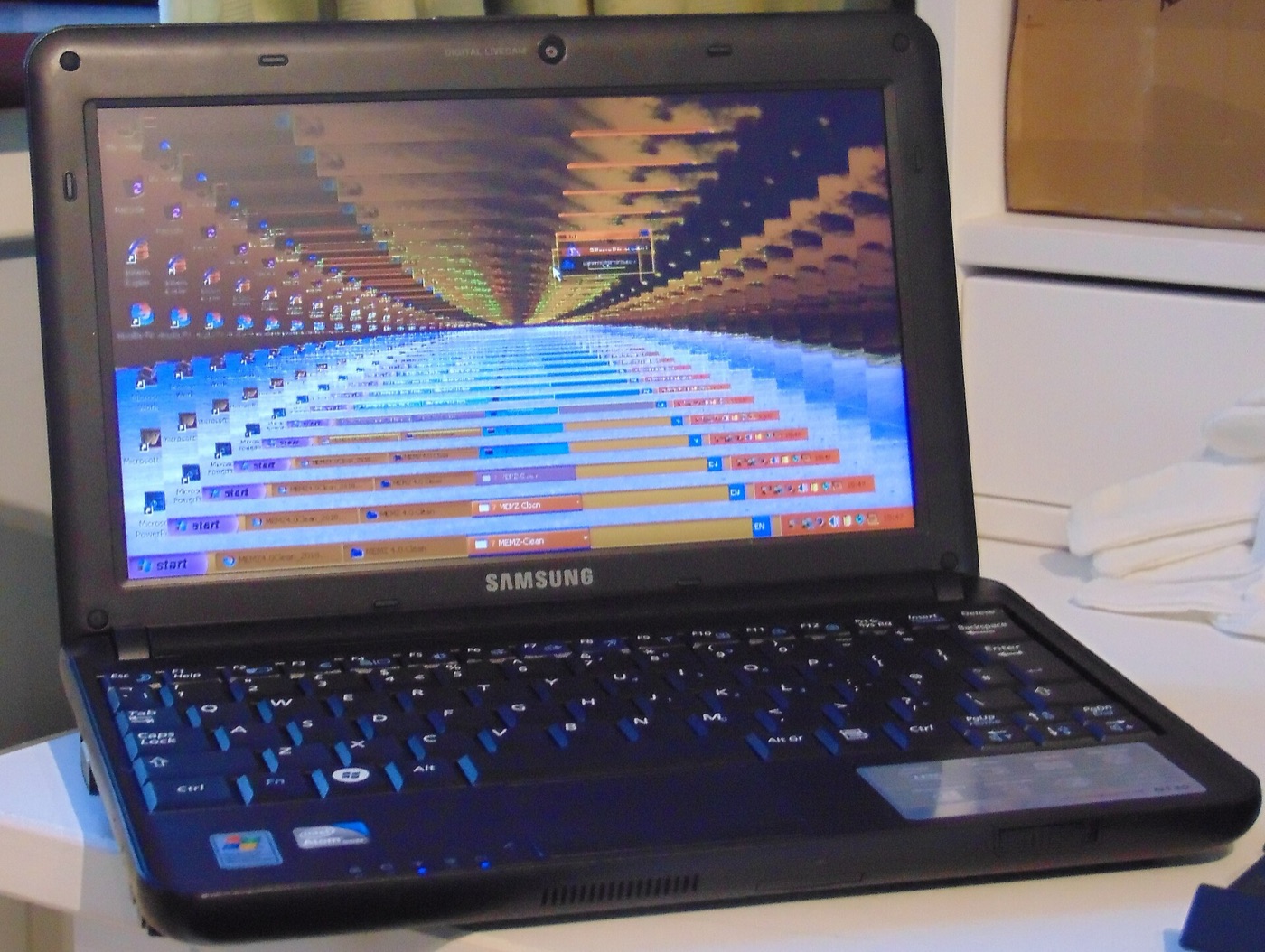
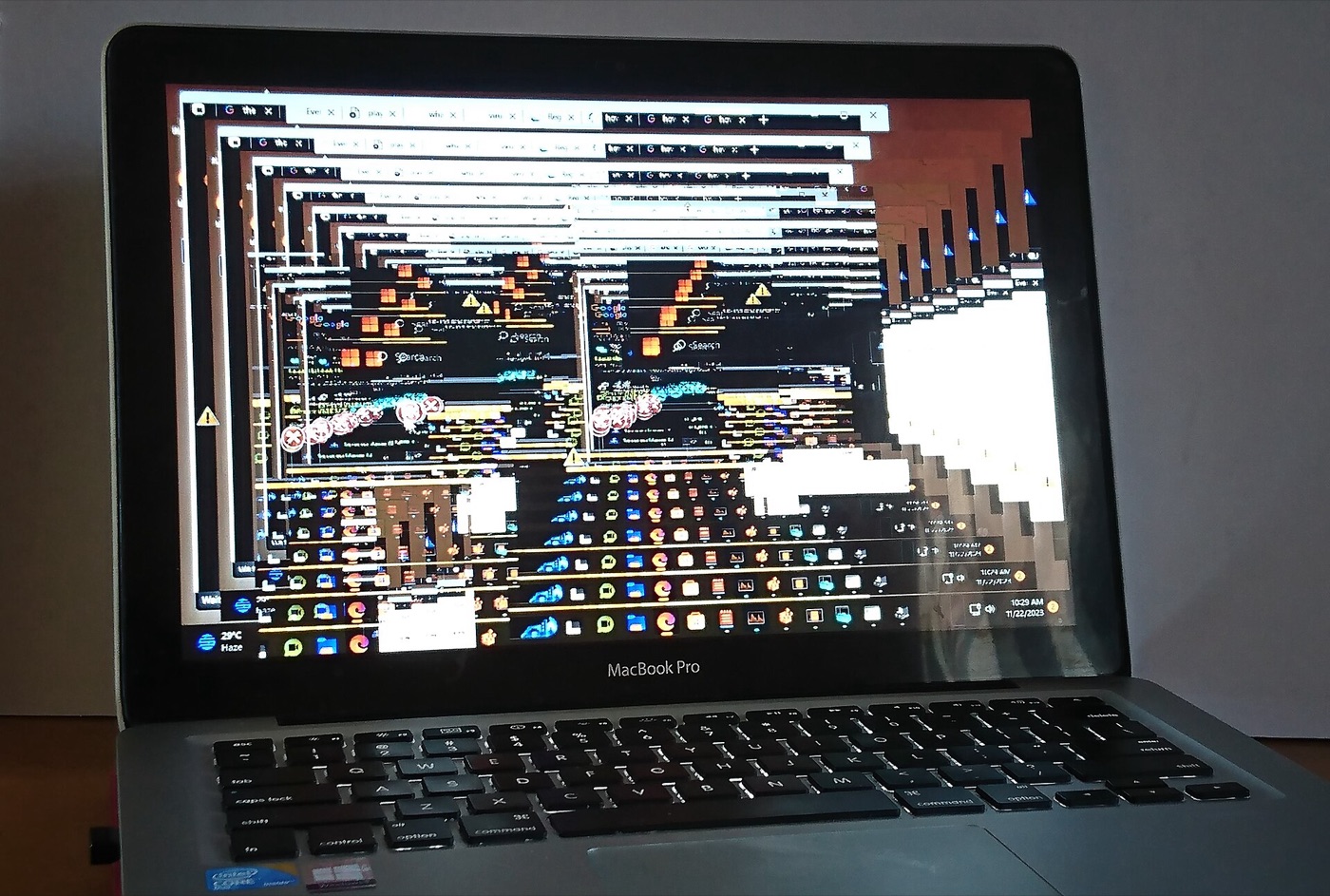
- The screen starts glitching: colors invert and the image gets copied into itself like a tunnel.
5. Nyan Cat
Eventually the PC is unusable, and the only option is restarting it. If you try to close MEMZ or kill its processes, it crashes Windows on purpose with a blue screen. When the PC starts again, instead of Windows you get a pixel-art Nyan Cat flying across the screen with its music and a counter, running from the overwritten MBR, and the message “Your computer has been trashed by the MEMZ trojan. Now enjoy the Nyan Cat…”. Windows is gone.
Why it still works on Windows 11 (sort of)
MEMZ needs administrator rights to overwrite the disk, so on Windows Vista and newer, the UAC prompt (“Do you want to allow this app to make changes?”) is the last line of defence. If you click Yes, it has full control.
On modern PCs with UEFI, you usually won’t see the Nyan Cat, because UEFI doesn’t start from the MBR like old BIOS PCs did. But the start of the disk is still overwritten, so Windows won’t boot either. Today, antivirus programs, including Microsoft Defender, detect MEMZ instantly, which is why people who test it turn protection off inside a virtual machine.
Under the hood
For something that destroys a PC, MEMZ is tiny. The original file is just 14,848 bytes, smaller than most photos. According to VirusTotal, it was compiled on 10 July 2016 at 12:59 UTC and uploaded to VirusTotal for the first time less than three hours later.
It’s really two programs in one. The part you see on Windows is written in C, built with Visual Studio 2015. The Nyan Cat that greets you after the restart is a completely separate little program written in assembly language, small enough to live in the first sectors of the disk and run before Windows even starts. Leurak called it “my first big thing written in assembly”, and he converted the Nyan Cat song from a MIDI file so it could play from there.
The blue screen when you try to close it isn’t an accident either. MEMZ starts several copies of itself: “watchdog” copies that keep an eye on each other, and a main copy that runs the effects. If one of them disappears, the others crash Windows on purpose.
There’s also a .bat version, which is why Trend Micro calls it Boot.BAT.MEMZ.A. That batch file is only 14,620 bytes: it unpacks MEMZ from a hidden zip with a tiny helper script, copies it into your user folder as MEMZ-Destructive.exe and starts it. Fun detail: Trend Micro rates its “destructiveness” as No, because it never deletes your files. That sounds like a joke after seeing the Nyan Cat, but it’s also why recovering your files usually works.
How MEMZ reaches people today
MEMZ is from 2016, but it hasn’t gone anywhere. When I looked it up on VirusTotal, someone had uploaded the exact same file on 1 November 2026, and 66 of 70 antivirus engines flag it. What really caught my eye is the list of names it has been seen with, around 50 of them. A lot are disguises:
- Fake game cheats and “boosts”:
geometry dash auto speedhack.exe,Optimization +80fps.exe,Minecraft launch mod.exe,Executor.exe(the name of Roblox exploit tools) andHorion.DLL.exe(a Minecraft hack client). - Fake harmless files:
MEMZ.jpg,installer.exe,back to school.exe, andшаурма.mp3.exe(“shawarma.mp3” in Russian), the same double-extension trick as ILOVEYOU.
My favourite has to be geometry dash auto speedhack.exe. It’s such an iconic name, the perfect bait for a kid who just wants to beat a level, and I still have that file.
MEMZ doesn’t always travel alone, either. VirusTotal knows around 1,300 files that drop MEMZ when you run them, and 45 programs that carry it hidden inside, including one named like DarkComet, a real remote-control trojan used by criminals. So if a “cheat” on your PC turns out to be MEMZ, it might not be the only thing it brought. If you ever find a file like this, don’t open it: delete it, or check it on VirusTotal first.
MEMZ vs MEMZ-Clean
| MEMZ (destructive) | MEMZ-Clean | |
|---|---|---|
| Overwrites the MBR | Yes | No |
| Blue screen if you close it | Yes | No |
| Choose which payloads run | No | Yes, from a menu |
| Safe to try? | Only in a VM | Safer, but still best in a VM |
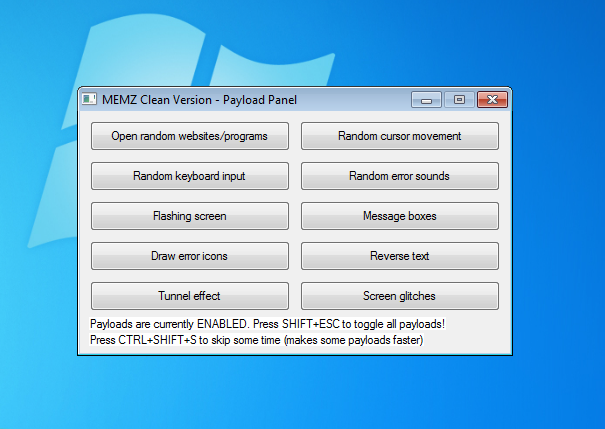
Leurak also released MEMZ-Clean, a version with only the visual effects and a control panel, so people could see the payloads without losing their PC.
Can you get your files back?
Usually, yes. MEMZ only overwrites the beginning of the disk, not your files. Don’t reinstall Windows straight away:
- Take the disk out and connect it to another PC, or boot the PC from a Linux live USB.
- Use a free tool like TestDisk to find and rebuild the lost partitions. In many cases your files show up again.
- Copy everything important to another drive.
- Trend Micro’s removal guide uses Windows’ own repair command: boot from a Windows installation USB, open the Command Prompt in the repair options and run
bootrec /fixmbrto write a fresh boot record. If the partitions were damaged too, TestDisk is the tool to rebuild them. - Then reinstall Windows cleanly with an installation USB.
Funny, but not harmless
The memes are a distraction. By the time the first Google search opens, the disk is already gone, and the only moment you could have stopped it was the UAC prompt asking for administrator rights. So never click Yes for a program you don’t trust, be careful with “free games”, game hacks and cracked programs (as the names above show, that’s exactly how MEMZ still spreads), and keep a backup. With a backup, even MEMZ is just a funny video.
Comments
Sign in with Discord to leave a comment. Be respectful: spam, insults and malware links are removed.