
Petya is one of the scariest pieces of ransomware ever made, and also one of the most interesting. Instead of encrypting your files one by one like normal ransomware, it attacked the whole hard drive before Windows even started, and greeted you with a flashing red skull. A year later, a copycat called NotPetya used its look to cause the most expensive cyberattack in history.
MBR + MFT
June 2017
How Petya worked
Petya arrived by email, pretending to be a job application. The “CV” was actually a program. When someone opened it and accepted the admin prompt, this happened:
- It replaced the boot record. Petya overwrote the MBR (the first part of the disk that starts Windows) with its own tiny program.
- It crashed Windows on purpose to force a restart.
- A fake “CHKDSK” appeared. When the PC turned on, it showed a screen that looked exactly like Windows checking the disk for errors. In reality, Petya was encrypting the Master File Table (MFT), the index that tells Windows where every file is on the disk.
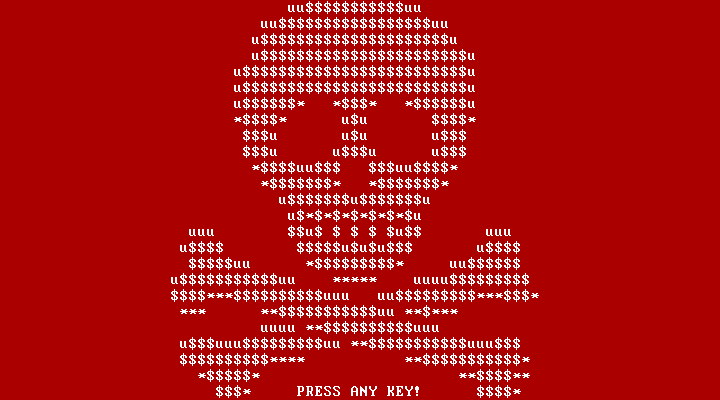
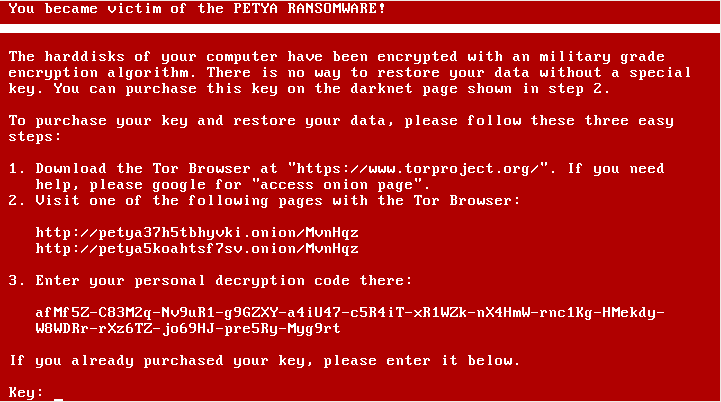
- The skull. When it finished, the flashing red skull appeared, followed by the ransom note.
The clever part: your files were still on the disk, but without the MFT, Windows has no idea where any of them are. It’s like ripping out the index of a huge library and mixing up every page number.
Petya and Mischa: ransomware as a service
The people behind Petya called themselves Janus Cybercrime Solutions, and they rented their ransomware to other criminals in exchange for a share of the money. The names come from the James Bond movie GoldenEye, where “Petya” and “Mischa” are two satellite weapons.
Petya needed admin rights to touch the disk. So in 2016 they added Mischa: if the victim clicked “No” on the admin prompt, Mischa ran instead and encrypted normal files, like regular ransomware. Either way, the victim lost.
Researchers fought back: in April 2016, a researcher known as leo-stone published a tool that could recover the key for the first version of Petya without paying. And in 2017, the creators themselves released their master key, so people infected with the original Petya could finally decrypt their disks.
NotPetya: the fake Petya that wasn’t ransomware
On June 27, 2017, a new attack started in Ukraine and spread around the world in hours. It looked a lot like Petya, so at first everyone called it Petya. But it was something very different, and researchers renamed it NotPetya.
It got in through M.E.Doc, accounting software used by most companies in Ukraine. Attackers had hacked its update system, so companies installing a normal-looking update were really installing NotPetya. Once inside a network, it used EternalBlue (the same leaked NSA exploit as WannaCry) and stolen admin passwords to jump to every PC it could reach.
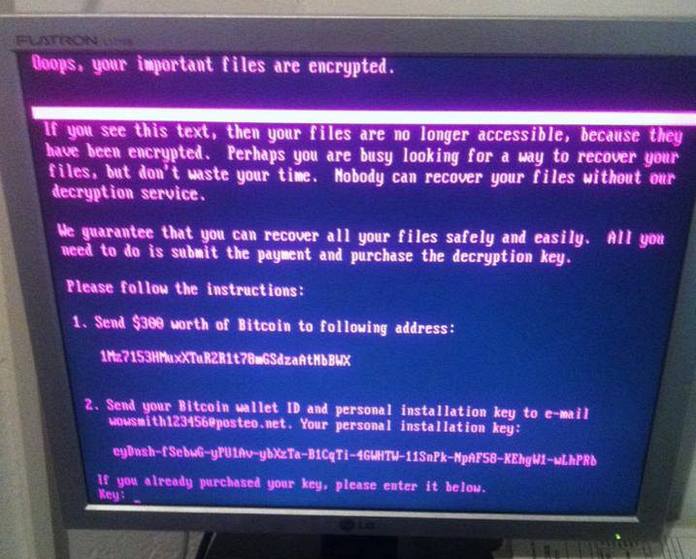
Then came the twist. NotPetya showed a ransom note asking for $300 in Bitcoin, but the “personal installation key” on the screen was just random data: the files could never be recovered, even if you paid. It was a wiper disguised as ransomware, built for destruction. Paying didn’t even work in practice, because the email address victims were told to contact was shut down by its provider within hours.
Why my test PC stays offline
When I test ransomware like Petya, the PC or VM never touches the internet or my home network. The original Petya can’t spread by itself, but NotPetya can, and I haven’t got the guts to risk putting ransomware on my whole home network (sorry, poor family). In a future video I’m planning a closed network with three PCs connected to each other, to show how a worm passes from one machine to the next.
The damage
NotPetya hit huge companies around the world: the shipping giant Maersk had to reinstall around 45,000 PCs and 4,000 servers, and the pharmaceutical company Merck, FedEx’s TNT Express, Mondelez (the company behind Oreo and Milka) and many others stopped working for days or weeks. Even the radiation monitoring at Chernobyl had to be done by hand.
The US government estimated the total damage at around $10 billion, making it the most expensive cyberattack ever. In 2018, the US and UK officially blamed the Russian military, saying the target was Ukraine and the rest of the world was collateral damage.
| Petya (2016) | NotPetya (2017) | |
|---|---|---|
| Goal | Money | Destruction |
| Spread by | Fake job application emails | Hacked software update + EternalBlue |
| Spreads by itself | No | Yes, a worm |
| Paying gets files back | Usually | Never |
| Screen color | Red with skull | Black and red text |
Could you have avoided it?
With Petya, mostly yes. It needed someone to open a “CV” that was really a program, and a document should never be a .exe file. If you ever see a disk check you didn’t expect right after a crash, turn the PC off immediately: with Petya, that could save the disk before the encryption finished.
NotPetya was harder, since it came inside a trusted software update. But Microsoft had fixed the EternalBlue bug in March 2017, three months earlier, and updated PCs couldn’t be infected that way. The companies that recovered fastest were the ones with backups that weren’t connected to the network, which at home can be as simple as a USB drive you unplug after backing up. And NotPetya proved that paying a ransom can get you nothing at all.
Comments
Sign in with Discord to leave a comment. Be respectful: spam, insults and malware links are removed.